
Last verified: June 2026. Claude's pricing, usage limits, and model lineup change often. Anthropic doubled the Claude Code limits in May 2026 and added weekly caps in 2025. Treat the numbers here as a snapshot and re-check the linked sources (claude.com/pricing, the Max plan article, and your own
/usageoutput) before committing to a plan.
The Quick Answer
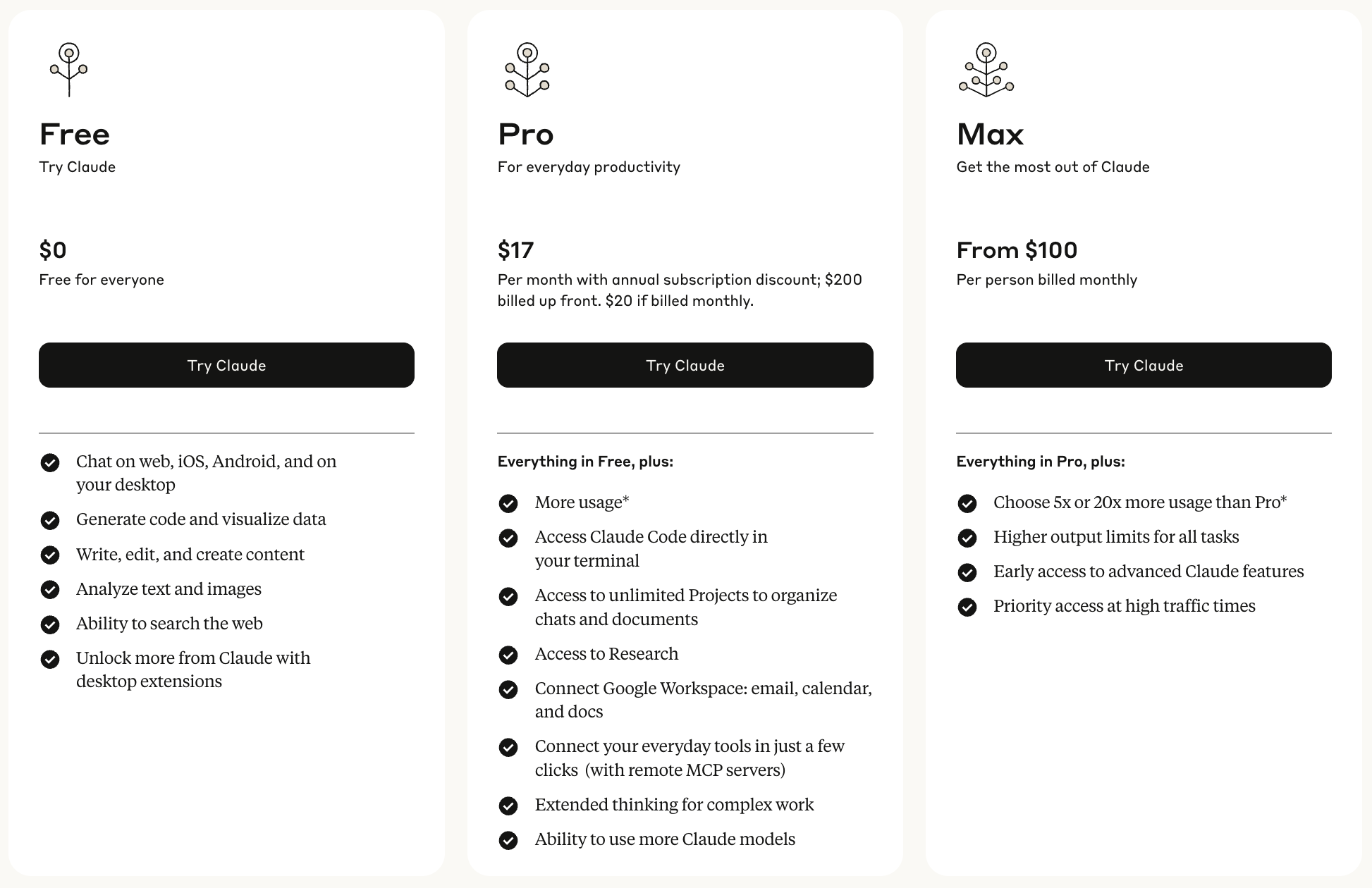
Start with Pro ($20/month) for small repos and occasional coding. It now includes Opus, not just Sonnet. Upgrade to Max 5x ($100/month) when you hit rate limits during a normal working day. Choose Max 20x ($200/month) if you code for hours daily, run multiple Claude Code sessions at once, or keep hitting the weekly cap on Max 5x. The dollar prices are confirmed on claude.com/pricing and the Max plan support article.
The single most important thing to understand before you pick: as of mid-2025 there are two limits stacked on top of each other: a rolling 5-hour window and a weekly cap. The 5-hour window is the one casual users notice; the weekly cap is the one heavy users actually hit. More on both below.
Understanding Claude Code Plans
Claude Code runs on the same Pro and Max subscriptions as Claude.ai. You sign into Claude Code with the same account, and your usage is shared across both. A heavy chat session on claude.ai eats into the same allowance Claude Code draws from (support.claude.com). There are three subscription tiers; the differences are how much you can run and which models you default to.
Plan Comparison at a Glance
| Plan | Monthly Price | 5-hour window | Weekly cap | Default model | Best For |
|---|---|---|---|---|---|
| Pro | $20 | 1x (baseline) | All-model + Sonnet weekly caps | Sonnet 4.6 (Opus available) | Solo devs, small projects |
| Max 5x | $100 | 5x Pro | Two weekly caps: all-model + Sonnet | Opus 4.8 | Daily coding, medium repos |
| Max 20x | $200 | 20x Pro | Two weekly caps: all-model + Sonnet (largest) | Opus 4.8 | Power users, solopreneurs, heavy development |
Sources: prices and the 5x/20x multipliers from the Max plan article; default models per account type from the Claude Code model-config docs (Max → Opus 4.8, Pro → Sonnet 4.6).
Why no exact message counts? Earlier versions of this guide quoted figures like "~45 messages per 5 hours." Anthropic doesn't publish per-message numbers, and they shift with model and message size. The pricing page and usage articles only describe limits in relative terms (Max 5x = 5× Pro, Max 20x = 20× Pro). On May 6, 2026 Anthropic doubled the 5-hour limits for Pro, Max, Team, and seat-based Enterprise and removed peak-hour throttling for Pro and Max (anthropic.com). The honest answer to "how many prompts do I get?" is: run
/usagein Claude Code to see your live remaining budget rather than trusting a hardcoded number.
How Usage Limits Work
There are two limits, and you can hit either one first.
The 5-hour window
Claude Code uses a rolling 5-hour window. Your usage resets 5 hours after your first prompt in a window, not at a fixed clock time. Max 5x gives you roughly five times the per-window budget of Pro, and Max 20x roughly twenty times (Max plan article). As of May 2026 these windows are double what they were, with no peak-hour reduction on Pro/Max (anthropic.com).
The weekly cap (the one that actually bites)
In addition to the 5-hour window, Anthropic introduced weekly limits in 2025. Max plans carry two separate weekly caps: one that applies across all models, and a second one for Sonnet models specifically (Max plan article). The weekly cap resets every seven days at a fixed time tied to your account, which you can see in Settings → Usage on claude.ai.
This is the limit most heavy users run into. You can stay under the 5-hour window all week and still get throttled because you exhausted the weekly all-model allowance. When you're deciding between Max 5x and Max 20x, the question is usually "do I hit the weekly cap?", not the 5-hour one. Anthropic's May 2026 change doubled the 5-hour limits but did not change the weekly caps (anthropic.com).
Important: Because usage is shared between Claude.ai chat and Claude Code, both draw from the same 5-hour and weekly budgets. Heavy terminal users should budget accordingly.
What Counts Toward Your Usage
Usage is measured in tokens, not "messages," so what you do affects how fast you burn the budget:
- File references: more files in context = more tokens per turn
- Output length: longer responses use more capacity
- Tool calls and long agentic runs: a single autonomous task can spend a lot
- Model choice: Opus costs more per token than Sonnet, which costs more than Haiku, so Opus-heavy work drains both the all-model weekly cap and (if you switch) the Sonnet-specific one differently
Which Models Each Plan Gets
The current lineup (June 2026) is Opus 4.8, Sonnet 4.6, Haiku 4.5, and Fable 5. Opus 4.8 went GA on May 28, 2026 and Fable 5 launched June 9, 2026 (models overview).
The key shift: Opus is no longer gated to Max. Both Pro and Max include access to all available models; the difference is the default. Per the Claude Code model-config docs:
- Pro defaults to Sonnet 4.6 (Opus is available, but you spend your budget faster on it)
- Max 5x / Max 20x / Team Premium / Enterprise pay-as-you-go default to Opus 4.8
So the practical model story is: Pro can reach for Opus when it matters but is tuned around Sonnet; Max tiers sit on Opus by default with much more headroom to stay there. Fable 5 (Anthropic's most capable Claude Code model, built for long autonomous sessions) is selectable with /model fable where your account has access (model-config docs).
Switching Models with /model
The command is /model, and the modern syntax uses aliases, not version-pinned strings. Run /model with no argument to open a picker, or pass an alias directly (model-config docs):
$> /model opus # latest Opus (resolves to Opus 4.8 on the Anthropic API)$> /model sonnet # latest Sonnet (4.6) — daily coding$> /model haiku # fast and cheap for simple tasks$> /model fable # Fable 5, for the hardest, longest-running tasks
If you saw /model opus-4 or /model sonnet-4 in an older tutorial, that syntax is obsolete. Use the aliases above, or pin a specific version with the full name (e.g. /model claude-opus-4-8). Two aliases worth knowing:
opusplan: uses Opus during plan mode, then automatically switches to Sonnet for execution. The best-of-both default for plan-then-build workflows.opus[1m]/sonnet[1m]: the 1-million-token context window. On Max/Team/Enterprise, Opus 1M is included; on Pro it requires usage credits (model-config docs).
Pro Plan: Getting Started
Pro ($20/month) is the right call for:
- Learning Claude Code workflows
- Small personal projects and side repos
- Occasional code generation and light refactoring
- Anyone who codes in bursts rather than all day
You default to Sonnet 4.6, which is genuinely strong for everyday coding, and you can reach for Opus on the harder problems. Just know it draws down your shared budget faster. Pro is the cheapest way to find out whether you're a 5-hour-window person or a weekly-cap person before paying for Max.
Max 5x: The Daily-Driver Sweet Spot
Max 5x ($100/month) is the tier for people who code most days. You get:
- 5x Pro's 5-hour budget, so you stop bouncing off the window mid-afternoon
- Opus 4.8 as your default model
- Opus 1M context window included (no usage credits needed)
- Two weekly caps that are sized for steady daily work
A realistic Max 5x day: review overnight CI failures in the morning, refactor a module midday, generate API docs in the afternoon, implement a feature in the evening, all without the rolling window cutting you off. Where Max 5x runs out is sustained, all-day, every-day usage that eats the weekly cap. If that's you, look at Max 20x.
Max 20x: For All-Day, Every-Day Work
Max 20x ($200/month) makes sense when:
- You code many hours a day, most days
- You run multiple Claude Code sessions in parallel (separate terminals, separate worktrees)
- You keep hitting the weekly cap on Max 5x, not just the 5-hour one
- You lean on Opus heavily and want the largest budget to stay on it
The honest test for Max 20x isn't "am I a power user"; it's literally whether your weekly usage on Max 5x gets throttled. Run a couple of heavy weeks on Max 5x, watch /usage, and upgrade if you're capping out. If you're a full-time developer or founder shipping daily, you'll usually know within two weeks.
When to Upgrade
Signs You Need Max 5x
You're consistently hitting the 5-hour window on Pro during a normal working day, or you want Opus 4.8 as your default rather than an occasional reach. Max 5x is the step that turns Claude Code from "tool I dip into" to "tool I work in."
Signs You Need Max 20x
- You hit the weekly all-model cap on Max 5x (check Settings → Usage)
- You run multiple sessions concurrently
- Your coding days routinely run 4+ hours of active Claude Code use
- You want the most headroom to stay on Opus without rationing
Power User Tips
1. Watch your real usage, not a guessed number
Run /usage inside Claude Code to see your live remaining budget for both the 5-hour window and the weekly caps. Check Settings → Usage on claude.ai for your weekly reset time. For historical analysis, community tools like ccusage parse your local logs. Claude Code itself will warn you as you approach a limit, but don't rely on it to report exact remaining usage mid-task; /usage is the source of truth.
2. Batch related work into one prompt
Tokens scale with turns, so fewer, fuller prompts stretch your budget.
Inefficient (three separate turns):
$> Fix the login bug$> Also update the tests$> And add error handling
Efficient (one turn):
$> Fix the login bug, update the related tests, and add proper error handling
3. Manage context to conserve budget
$> /clear$> @auth-module.ts @auth.test.ts # add only the essential files$> Implement OAuth2 integration
Clearing context between unrelated tasks keeps each turn's token count down, which matters most on Pro, where every token comes out of the smallest budget.
4. Pick the right model for the job
Don't run everything on Opus out of habit. Use /model sonnet for routine implementation and /model opus (or opusplan) for architecture and gnarly debugging. On Pro especially, staying on Sonnet for the bulk of the work and switching to Opus only when you need it is the difference between making it to Friday and getting throttled on Wednesday.
$> /model sonnet # routine coding$> Create CRUD endpoints for user management$> /model opus # complex analysis$> Identify architectural improvements across the codebase
Quick Reference
All Plans Include
- Claude Code terminal and IDE access
- Natural-language coding with
@file references - Git integration
- Access to all current models (Opus 4.8, Sonnet 4.6, Haiku 4.5, Fable 5 where available) via
/model - Shared usage budget with Claude.ai
Max Plans Add
- Opus 4.8 as the default model
- 5x (Max 5x) or 20x (Max 20x) the per-window budget of Pro
- Opus 1M context window included
- Larger weekly caps
- No peak-hour throttling
Usage Guidelines
| Task Type | Pro | Max 5x | Max 20x |
|---|---|---|---|
| Bug fixes | ✅ | ✅ | ✅ |
| Small features | ✅ | ✅ | ✅ |
| Large refactors | ⚠️ | ✅ | ✅ |
| Full-stack features | ⚠️ | ✅ | ✅ |
| All-day sessions | ❌ | ⚠️ | ✅ |
| Parallel sessions / weekly-heavy use | ❌ | ⚠️ | ✅ |
Final Recommendations
Start with Pro if:
- You're new to Claude Code or budget-conscious
- You work on small projects or code in bursts
- You want to learn your own usage pattern before paying more
Upgrade to Max 5x when:
- You're consistently hitting Pro's 5-hour window
- You're working on production code most days
- You want Opus 4.8 as your default
Choose Max 20x when:
- You hit Max 5x's weekly cap (verify in Settings → Usage)
- You run multiple sessions at once or code many hours daily
- You want maximum headroom to stay on Opus
Remember: you can start with Pro and upgrade as your needs grow. And because Claude's pricing and limits change often, re-check /usage and the linked sources before and after each upgrade so you're paying for what you actually use.
Related Guides
Quickstart with Claude Code
Get started with Claude Code in minutes. Learn essential commands and features to boost your development workflow.
Managing Claude Code context to reduce limits
Master context management in Claude Code to maximize your usage limits and maintain efficient coding sessions throughout the day.
Using OpenAI's Codex Plugin in Claude Code
Install OpenAI's Codex plugin in Claude Code, run second-opinion reviews, delegate tasks to Codex, and know which auth each side needs.