Know where agents get stuck in your MCP server
MCP analytics and observability for Claude Connectors and ChatGPT Apps. Record every session, see what each agent was trying to do, and catch errors as they happen.
- See every tool call your agents make
- Replay any session end to end
- Catch failures before your users do
Teams building Claude Connectors and ChatGPT Apps use AgentCat for MCP analytics








Full visibility into every agent interaction
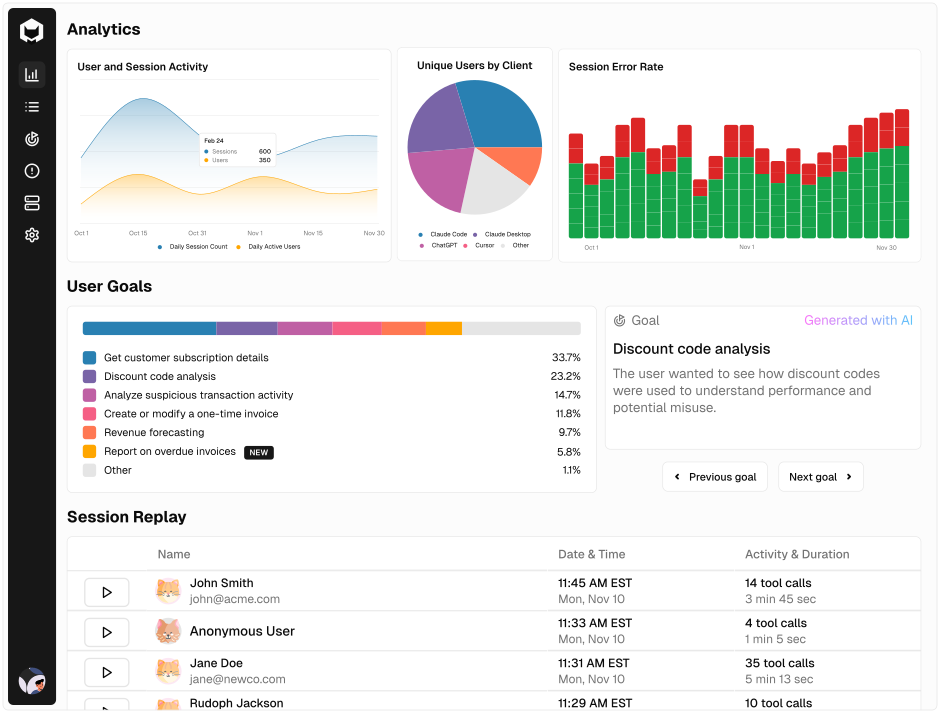
AgentCat records every session on your MCP server. Here's what you get.
Replay every session
Step through every tool call in any session and see the request, the response, and any error.
Understand agent goals
AgentCat labels each session with what the agent was trying to do, based on its activity and session history.
See usage analytics
One dashboard for your whole MCP server: sessions, errors, and how usage changes over time.
Detect issues automatically
Errors are grouped by impact, and per-tool error rates show which tools are failing.
Run A/B tests
Create an A/B test to check a fix, see the results, and ship the version that works.
Work in your existing tools
@mention AgentCat in Slack, or connect the tools you already use through AgentCat's MCP server.
HOW IT WORKS
Up and running in minutes
- 1
Install the SDK
Add AgentCat to your MCP server with one line of code. The TypeScript and Python SDKs are open-source and available on GitHub.
- 2
Sessions stream in
Every agent session appears in your dashboard as it happens, broken down tool call by tool call.
- 3
Fix the biggest issues first
Errors are grouped by impact and each session is labeled with the agent's goal, so you know what to fix first and what to build next.
FAQ
Common questions
What is AgentCat?
AgentCat is an analytics and debugging tool for MCP (Model Context Protocol) servers. It records every agent session so you can watch usage live, replay sessions, and track errors and performance.
How long does setup take?
Minutes. Install the open-source TypeScript or Python SDK in your MCP server with one line of code, and sessions start appearing in your dashboard.
Does AgentCat work with Claude Connectors and ChatGPT Apps?
Yes. AgentCat runs inside your MCP server, so it works with any MCP client, including Claude Connectors and ChatGPT Apps.
Is there a free plan?
Yes. The Free plan includes 500 sessions a month, session replay, and the analytics dashboard. No credit card required.